
Hrly OS (Part 3 of 4) — Redesigning Billing for Complete Automation
1. Overview
After automating the task reporting in Part 2 - Testing for Automation and Efficiency, the next bottleneck became unmistakable: billing. Even with cleaner data and automated updates, the final step still depended entirely on the billing manager manually reviewing hours, preparing invoices, and charging clients. The workflow was reliable, but not scalable, and it still carried the same human factors that had affected earlier stages of the system.
This part focuses on redesigning this final mile of the workflow. The goal was to explore whether billing could move from a manual, person driven task into a fully automated process that runs from inside Google Sheets. This phase was less about polishing a finished product and more about validating critical ideas: can usage based billing work for service hours, can Stripe’s metered billing model fit our business logic, and can we remove the billing manager from the process without reducing accuracy or oversight.
This is where the system began shifting from an organized spreadsheet workflow into a true prototype of a software product. I built a working end to end script that reads finalized work entries, converts hours into billable units, posts meter events to Stripe, updates sheet statuses, and emails a detailed summary of every billing run. The goal of this phase was simple; test if complete automation of billing was not only possible, but dependable enough to scale.
2. Key Challenges
Billing was fully manual, requiring the manager to create invoices, break down hours into units, add custom line items, and trigger autocharges every week.
Timing was inconsistent, since weekly billing depended entirely on one person’s availability, workload, and attention.
There was no automated link between the Time Sheet and Stripe, so usage could not be billed directly without manual calculation and entry.
Scaling became costly, because more clients meant a proportional increase in repetitive, sensitive billing tasks for the manager.
3. Research & Insights
To redesign the billing workflow, I studied how our manual invoicing process behaved over several months and how Stripe’s usage based model could support automation. A few patterns became clear:
The manual invoicing loop was fragile. Rusab had to interpret the Time Sheet, convert hours into units, split fractional hours into custom line items, and create weekly invoices by hand. Any distraction or timing slip led to delays or mismatches.
Human factors created variability. Weekly billing sometimes happened early, sometimes late night, and occasionally got postponed during busy weeks. This irregular cadence made it harder to maintain predictable cash flow.
Stripe’s existing setup did not integrate naturally with our workflow. We were using one time invoices for hourly products, but nothing connected the Time Sheet to Stripe in a way that allowed direct usage reporting.
Long term clients preferred a smoother, subscription like experience, while short term or new clients still needed safety controls to prevent large unpaid balances. This highlighted the need for usage reporting plus Stripe’s billing threshold feature.
These insights shaped the direction of Part 3; automating billing required a model that stayed flexible for different client types, removed human timing risks, and connected our sheets directly to Stripe without introducing extra steps for the team.
4. Design Process
In this phase I redesigned how billing works by mapping the complete journey of a task memo across Time Sheet, Client Sheet, and finally Stripe. The goal was to create a fully automated billing loop that removes human timing, judgment, and manual arithmetic from the process.
a. Mapping the full task life cycle
Before designing automation, I defined the exact states a task travels through. This clarified which script should act at each point.
Task journey:
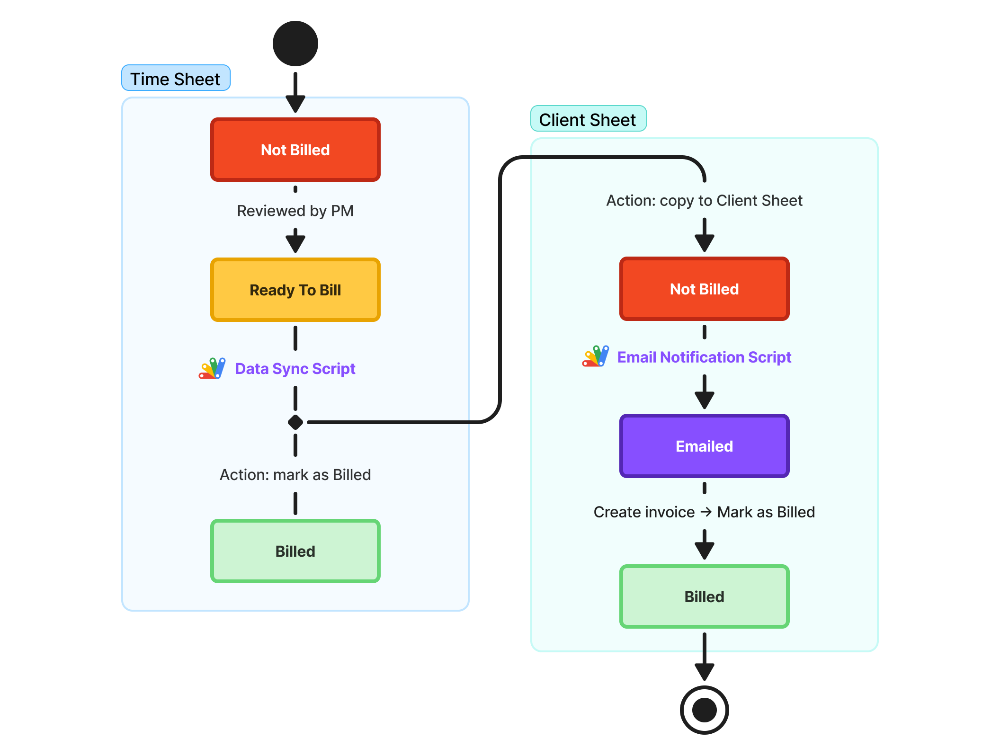
This gave me a clear, deterministic funnel that scripts could follow without confusion or overlap.
b. Splitting automation into three independent scripts
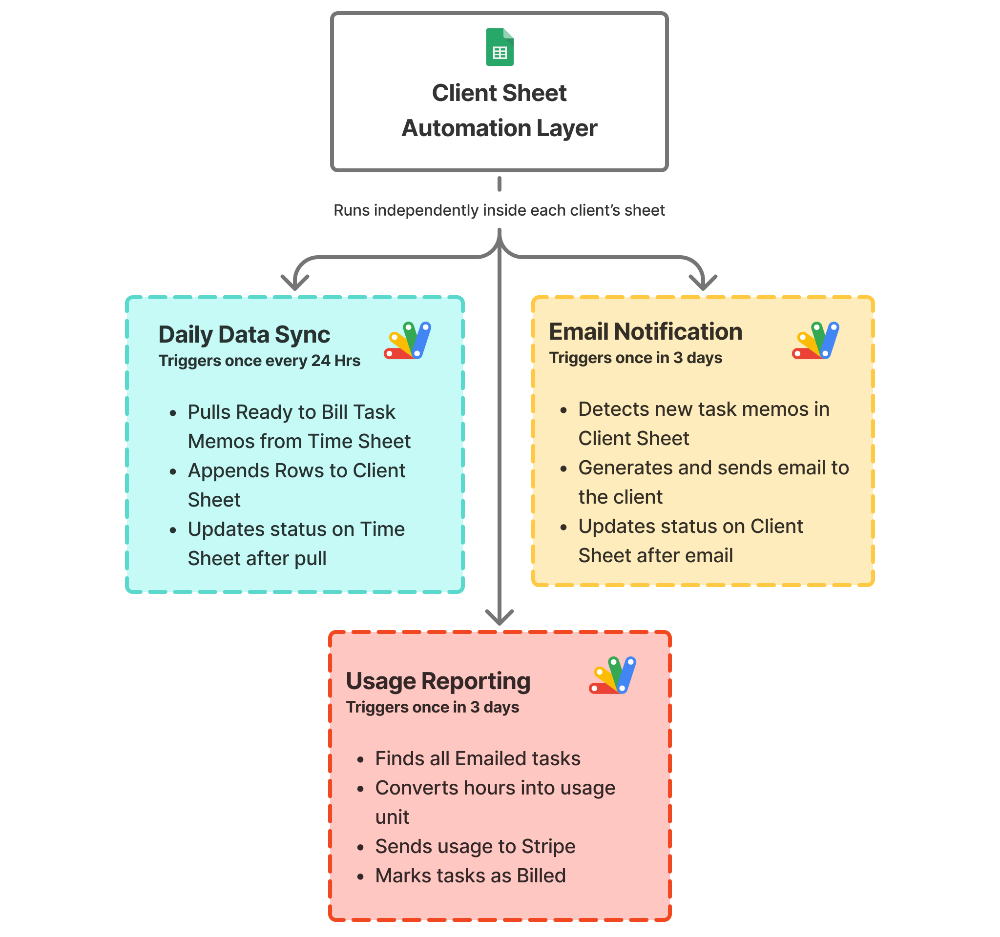
To keep the system easy to debug and predictable, each Client Sheet contains three small automations rather than one large one:
Daily Data Sync
Pulls all Ready To Bill tasks from Time Sheet, appends them to the Client Sheet, and marks them as Billed in the Time Sheet.Email Notification (every 3 days)
Looks for Not Billed tasks in the Client Sheet, sends them as a summary email to the client, and changes their status to Emailed.Usage Reporting (every 3 days)
Collects Emailed tasks, converts their hours into block units, reports those units to the client’s Stripe meter, and marks the tasks as Billed in the Client Sheet.
c. Designing the billing unit
To translate work hours into Stripe compatible usage (integers only), I tested multiple unit models:
The 15 minute block struck the right balance between accuracy and clean billing amounts, making it ideal for agencies with diverse task sizes.
d. Keeping automation client specific
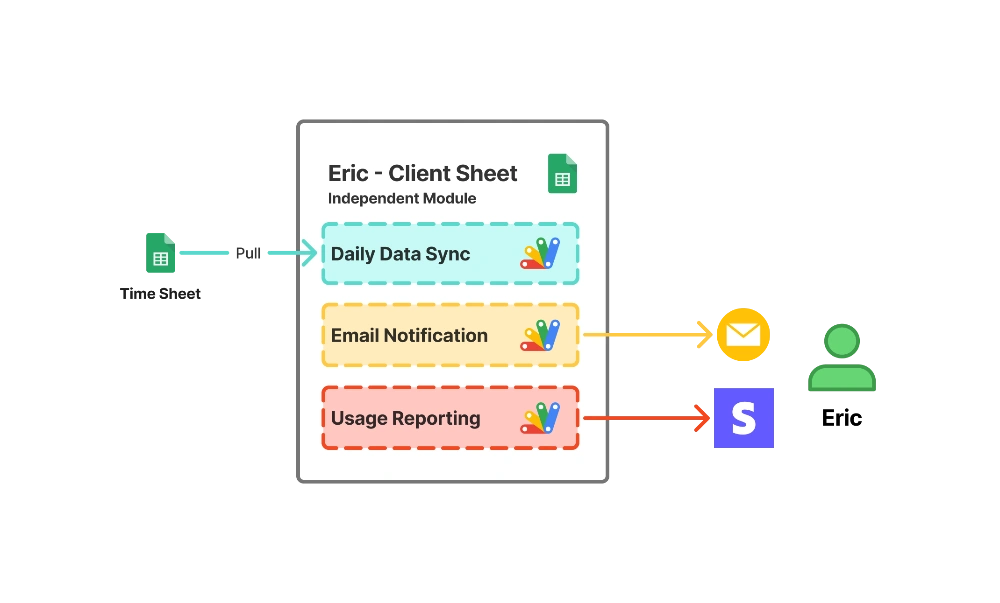
Each client has their own Client Sheet with their own script trio. This allowed:
independent schedules
individual Stripe customer IDs
isolated data pipelines
easier debugging
Since scripts run inside each Client Sheet, they only pull from the Time Sheet and never interfere with each other.
5. System Design & Implementation
With the task lifecycle and automation steps defined, I translated the workflow into a structured system inside Google Sheets and App Script. Everything runs at the Client Sheet level, so each client has an isolated billing pipeline that pulls from the Time Sheet and reports directly to Stripe.
The goal was simple: allow the sheets to move information from reporting to billing on their own, with the billing manager stepping in only for oversight.
Key Functions and Logic
Why this structure works
Each Client Sheet acts as its own micro service that handles sync, communication, and billing independently
Scripts never overwrite each other because they operate on clear status rules
Managers no longer carry timing or calculation responsibilities
Every billed task can be traced from Team Member → Project Manager → Client Sheet → Stripe
6. Results & Impact
Fully eliminated manual billing work as measured by reducing the billing manager’s weekly tasks from dozens of steps to zero, by automating data syncing, status updates, usage reporting, and Stripe charging.
Improved billing accuracy to near perfect levels as measured by the removal of manual hour breakdowns and custom line items, by converting all time into consistent 15 minute units reported directly to Stripe.
Achieved reliable, on schedule billing cycles as measured by consistent automated reporting every three days, by removing human timing and replacing it with predictable scripted triggers.
Delivered seamless end to end billing automation as measured by the system’s ability to move tasks from reporting to Stripe without any manager involvement, by distributing independent automation modules across Client Sheets.
7. Reflections
What worked
The system achieved complete billing automation with minimal logic and a simple sheet based structure
Status based transitions made the entire pipeline predictable and easy to audit
The block based billing model kept calculations clean and consistent across all clients
What didn’t
Onboarding became more complex since each client now requires sheet setup, Stripe configuration, and testing
Spreadsheets introduced an unlimited affordance for user errors, where even small deviations in format or input behavior could disrupt the financial pipeline despite validation and safeguards
8. Next step
With billing fully automated, the next challenge is removing the fragility that comes from running critical financial logic on spreadsheets. The system works, but it still carries the natural affordances of a sheet based environment where any unexpected input, formatting error, or manual edit can introduce risk. It also becomes harder to onboard new clients as Stripe settings, IDs, and scripts must be configured one by one.
The next phase is to rebuild everything as a dedicated product.
In Part 4 (final part), I design Hrly OS as a complete operating system with robust database, role based access, cleaner workflows, and a controlled interface that eliminates accidental actions entirely. This final step focuses on long term scalability, security, and a user experience that removes user error scopes while keeping the automation intact.

