
Hrly OS (Part 1 of 4) - Designing Structure Out of Chaos
1. Overview
In March 2023, when my design and technology agency BiTechX became an LLC, we decided to transition away from Upwork and begin working with clients directly. While Upwork had provided a convenient ecosystem for contracts, time tracking, and billing, its high service fees and rigid processes often limited flexibility and value for both sides.
Once we left the platform, I realized just how much Upwork had been managing behind the scenes, from tracking billable hours to automating invoices and payments. Without those tools, even simple admin tasks became time-consuming and error-prone.
To solve this, I started designing a custom ecosystem from scratch using Google Sheets. The goal was to recreate the structure and automation we lost, while making it more transparent and adaptable to our agency’s growing needs. This system became the foundation for a smoother, more efficient way to manage hourly work, track finances, and maintain accountability across projects and clients.
2. Key Challenges
Leaving Upwork meant losing its built-in systems for time tracking and automated billing.
Work hours were logged inconsistently across multiple tools, with no single source of truth.
Managers struggled to track each team member’s output and identify which hours were billable.
Preparing invoices required gathering data manually from different sheets, often causing delays and errors.
As the number of clients grew, the ad hoc process became increasingly difficult to manage and maintain.
3. Research & Insights
I began with a simple Google Sheet to log task reports and conducted unmoderated research, observing how my coworker and friend, Rusab Sarmun, managed the billing process while the rest of the team submitted their daily work updates. Rusab is reliable and quick to adapt, yet famously prone to mistakes when handling constantly changing admin tasks. During the early stages of our business, I kept refining our internal processes as new clients arrived with different requirements.
Common Errors Observed
Forgetting to bill a completed task or project
Accidentally billing the same task more than once
Mixing up reports and billing one client’s task to another client
Missing updates from team members due to scattered communication
Losing track of which tasks were finalized, billed, or still pending
Struggling to reconcile income and expenses accurately at month-end
4. Design Process
Before developing the system, I approached it as a design problem. The goal was to reduce administrative work while offering our clients the same transparency and convenience they once experienced on Upwork, where they could review timesheets, track billing, and receive weekly updates automatically.
Unlike a large platform, we didn’t have the resources to build a sophisticated software product from scratch. So I focused on creating a lightweight, flexible system that small teams like ours could afford to maintain; one that achieved the same reliability through thoughtful structure, clear logic, and simple automation rather than complex engineering.
I began by mapping the entire workflow across all user types; professionals, project managers, billing managers, and clients, to understand how information moved through the process and where breakdowns occurred. The goal was to make every handoff between people and steps intuitive, traceable, and efficient.
Professionals - User Flow
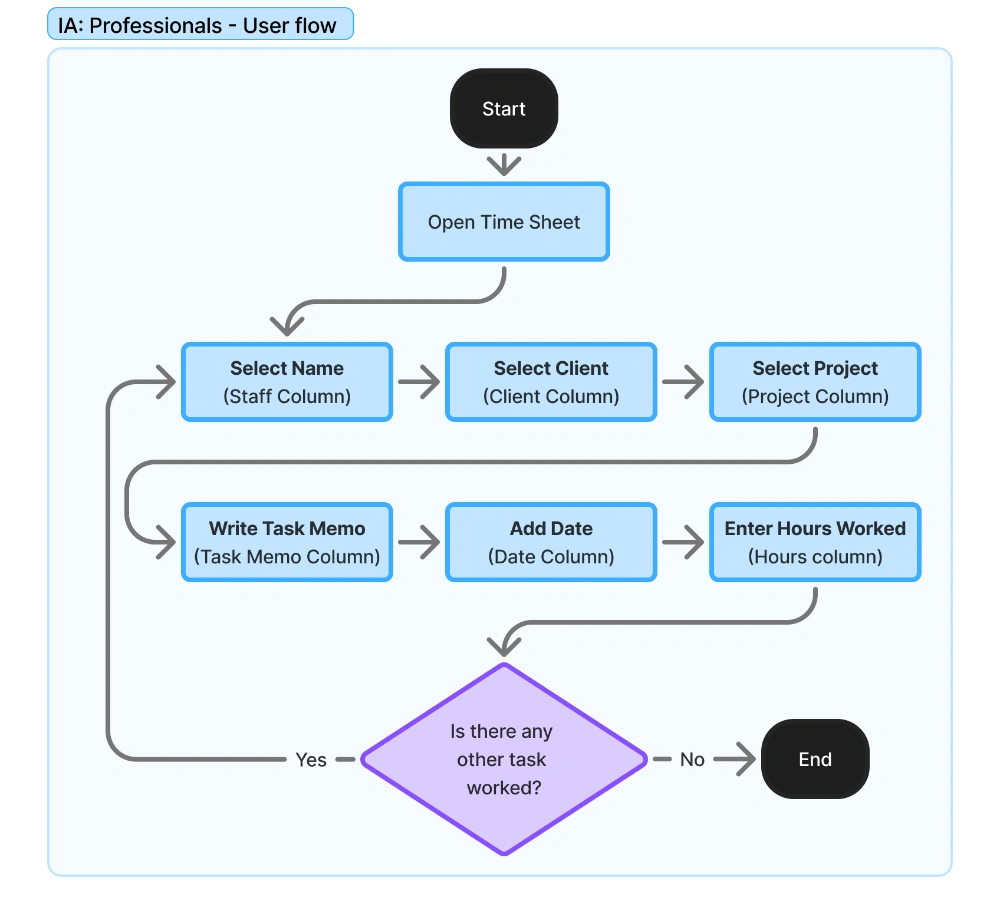
The work report submission process needed to be simple enough to update daily without friction yet structured enough to ensure accuracy across the system.
Project Managers - User Flow
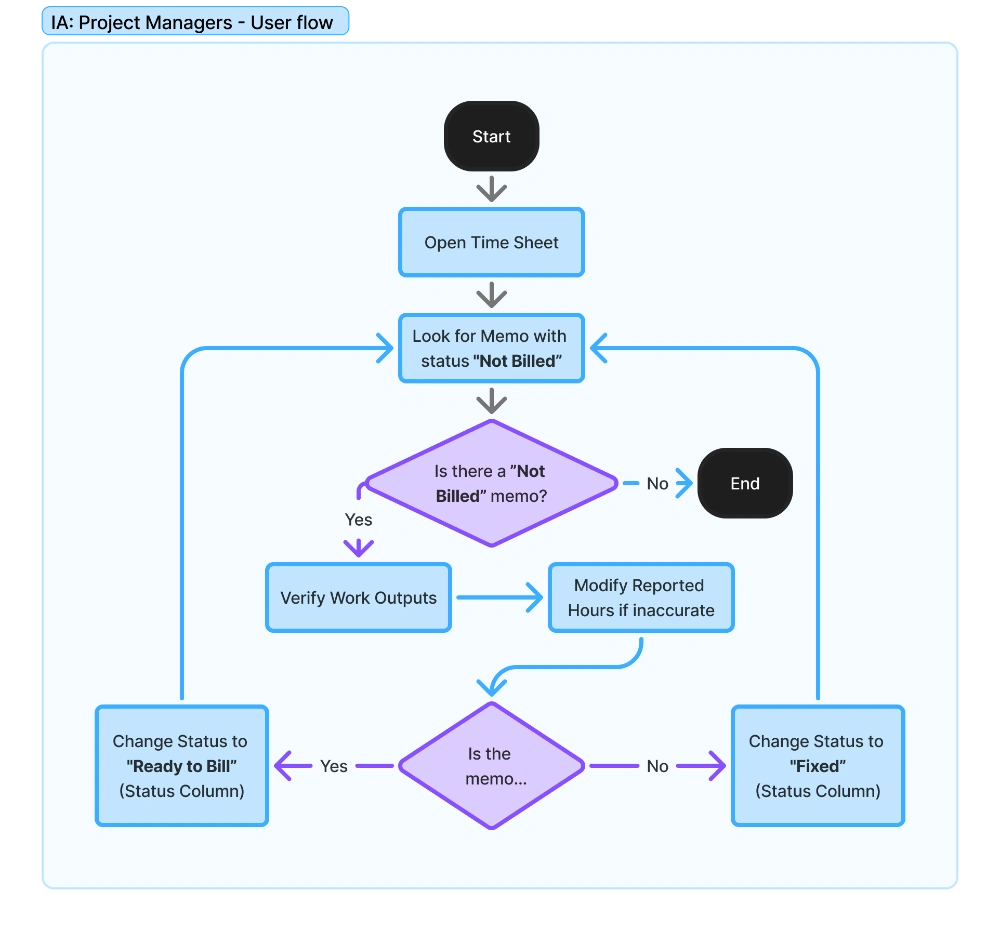
Project managers required visibility and control. Their flow emphasized review efficiency and accountability, ensuring finalized work could move forward without confusion or double handling.
Billing Manager - User Flow
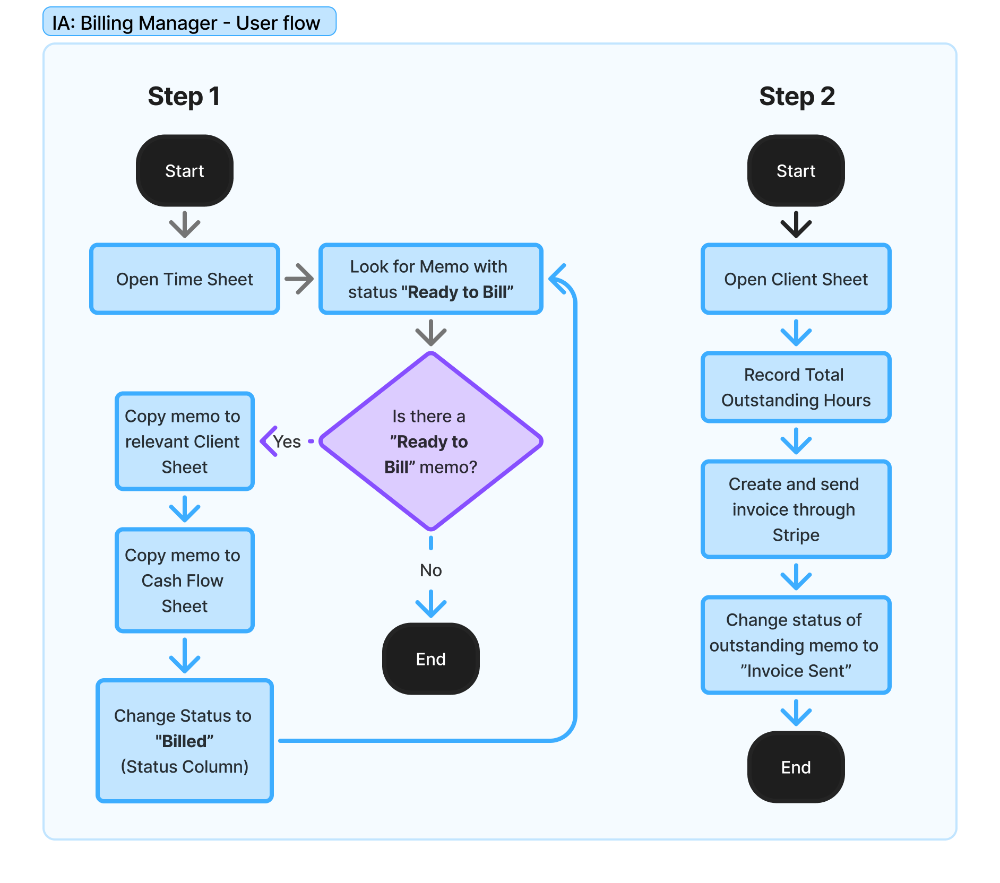
Billing managers handled the most sensitive and often irreversible tasks, so I designed their process around multi-point verification.
Every part of the design was driven by three principles; simplicity, transparency, and sustainability. The goal wasn’t to replicate Upwork’s scale, but to capture its clarity and trustworthiness within the realistic limits of a small business.
5. System Design & Implementation
The system was built in Google Sheets, using a modular structure where each sheet served a distinct role but remained interconnected through dynamic references. The goal was to create a transparent and automated workflow that could function with minimal manual input, yet provide detailed visibility for everyone involved; professionals, managers, and clients.
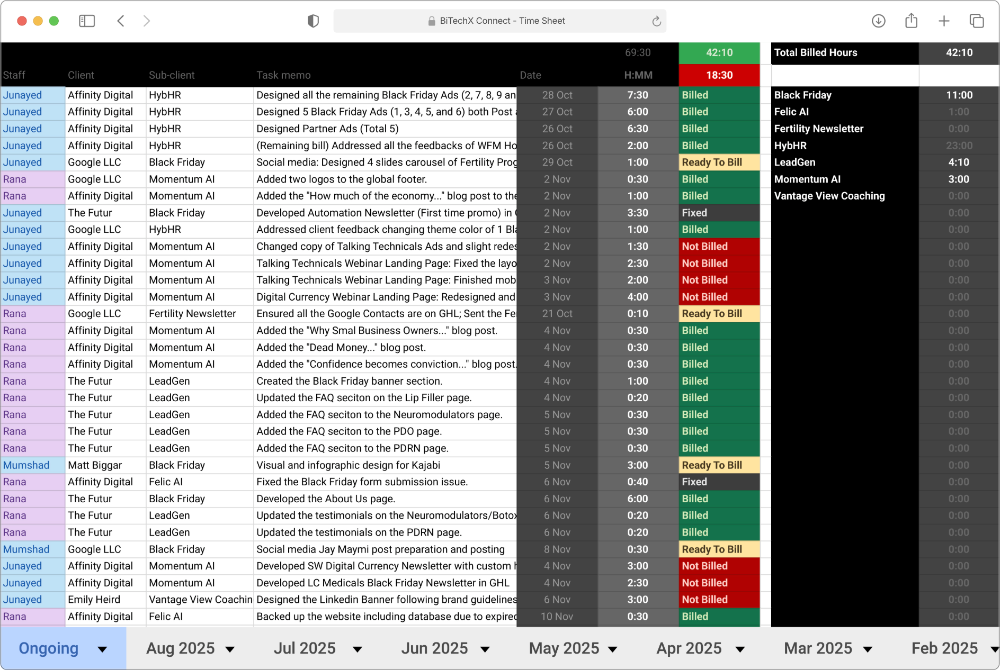
The foundation began with a log-based structure that captured work entries in a standardized format. This structure became the single source of truth for all billing and reporting activities. Each entry, once finalized — automatically reflected in higher-level sheets, such as client and Cash Flow.
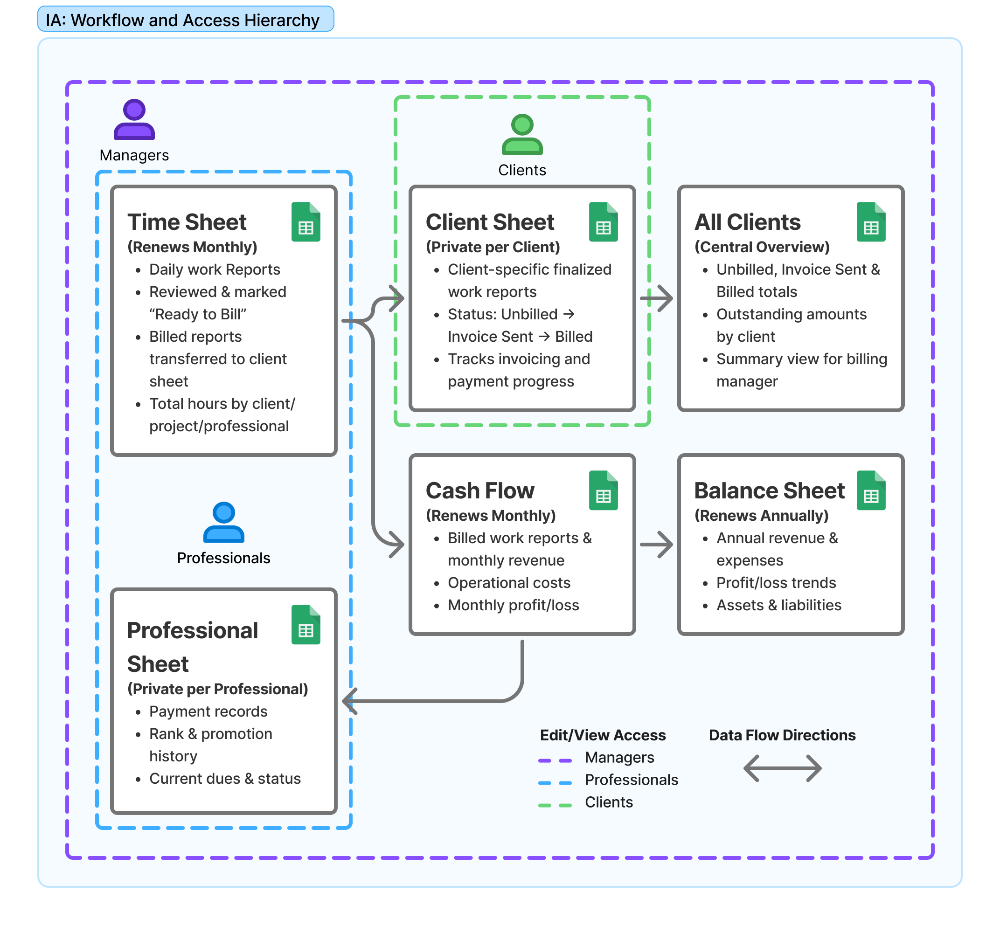
Access control was a key part of the design. Each user group had a clearly defined view:
Professionals could log and review their own work.
Project Managers could verify, edit, and approve entries.
Billing Managers handled invoicing and client payments.
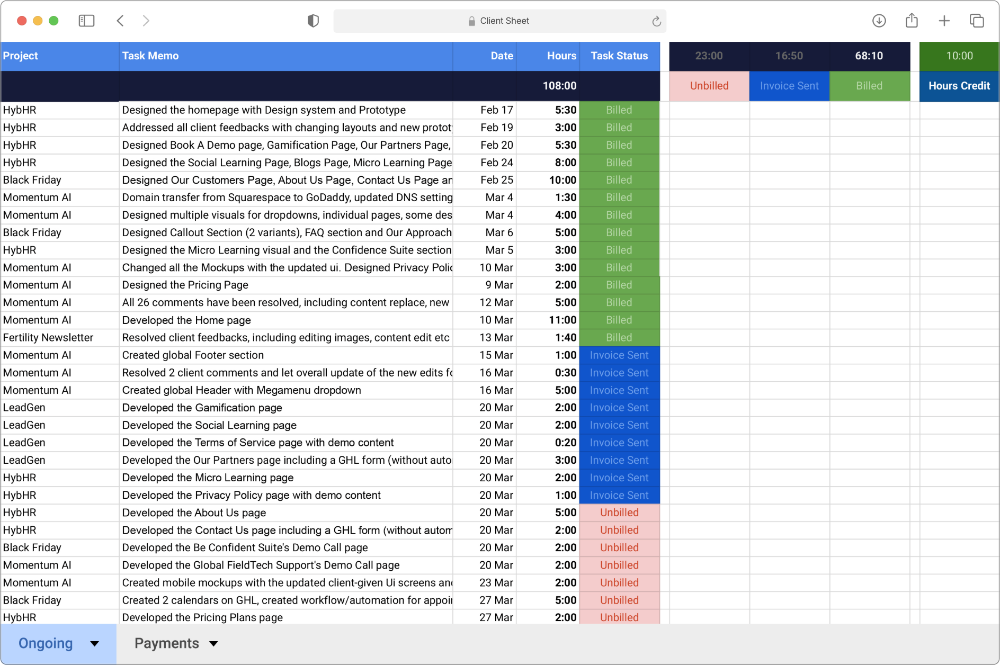
Clients viewed only their own billed and unbilled work through dedicated sheets that mirrored the internal system.
Finally, all financial data; including revenue, expenses, and operational costs — flowed into an annual Balance Sheet. This high-level view provided insights into monthly profit, growth trends, and long-term performance.
Time Sheet
Client Sheet
6. Results & Impact
Reduced weekly admin time by 54% as measured by how quickly project managers and the billing manager can now review, finalize, and bill work reports — what once took half a day now fits comfortably within a short review session.
Eliminated billing errors since the system’s latest iteration, which has been live-tested for over 14 months, by introducing structured review steps and clear status tracking.
Improved client transparency as measured by a drop in billing-related questions, by giving clients self-service access to their progress and payment status.
Increased accountability as measured by faster verification and fewer review conflicts, by introducing cleaner, traceable records across all roles.
Enabled smoother scaling as measured by reduced onboarding time for new professionals, by designing a plug-and-play system requiring no additional setup.
7. Reflections
What worked
Brought structure and clarity to a messy process.
Cut admin time by 54% through clearer workflows.
Reduced billing errors and confusion for Rusab.
What didn’t
Still relied on manual updates between sheets.
Clients had to visit Google Sheets to track work; inconvenient for many and confusing for those unfamiliar with it.
8. Next Step
In BiTechX Connect Part 2 of 4: The Smart Spreadsheet, I began solving these issues with automation and smarter triggers that shared updates without clients needing to navigate spreadsheets.

